Thursday, March 31, 2011

Review – Super Mario Crossover

If you're like me you still enjoy playing the first Super Mario Bros game from the NES (Nintendo).  What would you do if you could play it as Link from the Zelda games?  Bill from Contra?  How about Megaman, Samus from Metroid or even Ryu from Ninja Gaiden and Simon Belmont from Castlevania, all with special powers and moves?

Welcome to Super Mario Crossover.  I suggest that you stop reading this review and go play it right away.  Come back afterwards though! ;)

---

URL: http://www.explodingrabbit.com/games/super-mario-bros-crossover


Super Mario Crossover

Tuesday, March 29, 2011

Review - Sysinternals

I've always found it handy to keep a few system utilities on hand since after all you never know when you're going to need them.  Sometimes though you'd need one or two that were a little more advanced.  That's where the SysInternals suite comes in.

The great tools in this set let you do pretty much anything you could need: there is a utility that monitors file access, one that monitors open net connections, another that wipes files securely off your hard drive, and even one that can be used as a replacement for the task manager that comes with Windows.

Overall I can't think of a reason why you shouldn't take a look and see what's available on their site.  There are easily 30 or so utilities there, all of them are free too.

One last note for fun: the apps are so good and handy that Microsoft went and bought the company!  Enjoy.

---

URL: http://technet.microsoft.com/en-us/sysinternals

Sysinternals

Sunday, March 27, 2011

Review – Unlocker v1.9.0

Here's a quick review about a handy utility to have around when working with files on a busy system.  Unlocker does just that to your locked files: it allows you to move, delete or rename your files that are in use.

Ever see a prompt in Windows telling you that the file you're trying to work on is in use?  Annoying isn't it?  Fight back.  Start up Unlocker and point it to the file and choose to unlock it, then do the desired action.  No need to reboot.  Just watch what file(s) you use it on because you could make something crash.

---

URL: http://unlocker.emptyloop.com/

Unlocker

Thursday, March 24, 2011

Review – 7-Zip v9.20

In a digital world filled with exchanges of information, compression is your best friend.  Save disk space, upload and download files in less time too.  But with so many choices of compression software out there, which one will meet your needs?

I present you with my favorite one: 7-Zip.  It's free without nag screens, it's fast, it's light and bare-bones in the best way possible: no useless features!  This handy program can handle plenty of file formats and offers a simple shell extension paired with a nice file manager style interface in the main app.

I've used it for a few years now (only a few since it's still somewhat new!) And so far I must say it's rather nice and stable, even if the version I use says that it's a beta.  One nice feature is that it can create ZIP files that have higher compression ratios then with other software, yet they stay compatible, for when you want your uploaded files to remain as accessible to your family and friends as possible.

This is one of the first apps I install on a PC and I can highly recommend it to anyone.

---

URL: http://www.7-zip.org/

7-Zip

Tuesday, March 22, 2011

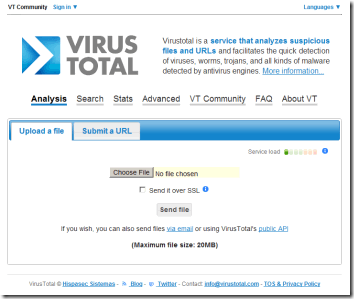
Review - VirusTotal

Having a good anti-virus these days is essential.  Sometimes however it's good to have a second opinion.  Well what if you had 42 of them?

VirusTotal is a nice site to have around for times when you seriously want to scan a file and make sure that it's clean.  When uploading, it calculates a hash of the file and lets you know if it has been scanned in the past to give you the result right away and avoid waiting for the scans to take place, although you can ask it to re-analyze it since newer definitions to the scanning engines have since come out, detecting newer viruses and removing some false positives.

Another nice feature is a shell extension that you can install on your computer to upload and scan files with a simple right-click.  This is optional however, and is available for your convenience.

---

URL: http://www.virustotal.com/ 

VirusTotal

Monday, February 7, 2011

Review - IrfanView v4.28

Seeing as my last review was about a lightweight PDF viewer, here is a post about a free, fast lightweight image viewer.

Now there aren't many people out there on the web that have never seen or heard of IrfanView.  After all, it is small and loads quickly, it has extra functionality with the help of plugins and has been around since the days of Windows 95.  There's a lot to be said about a program that has been used for so many years by its fans.

I for one use it to browse images on my computer and to sort them into different folders.  I also use it when I take screenshots, resizing and choosing the file format that I consider best for the occasion.  It happens to be the program that I use to take the screenshots of the apps I review when writing these blog posts.

You can use it to view an images metadata, such as EXIF in a JPG file too, which can be handy for people who enjoy photography.  Users can watch video files with it, or listen to audio files too.  You can print images, do some basic editing and adjusting.  It even has Photoshop filter support.  One last little note is that you can even change the toolbar icons, giving it a different feel if you'd like.

---

URL: http://www.irfanview.com/


IrfanView

Thursday, February 3, 2011

Review - Sumatra PDF v1.2

Since the rise in popularity of PDF files, many users have abandoned the default reader made by Adobe choosing instead faster programs, or those with more features out of the box.

Sumatra PDF is a slim, lightweight PDF reader which keeps its goal simple: To display PDF files to the user.  No more, no less.  For users such as myself, it is exactly what I've wanted all along.

With a minimal impact on your computers resources, it will allow you to view PDF files with ease, albeit while rendering the pages a little slowly.  It is the only negative comment I can think up about it, and I figure if that's all I see as a downside while using it, it must be a pretty darn good program.  So why don't you give it a shot?  It's even portable so no data is written to the registry.

---

URL: http://blog.kowalczyk.info/software/sumatrapdf/free-pdf-reader.html

SumatraPDF

Wednesday, January 12, 2011

Review - VLC v1.1.5

Do you find yourself installing more and more CODECs to simply play a video file you have been sent or that you've just downloaded from the web?  Need another program to find a needed CODEC and hopefully guide you to the right website to get it from?

In comes VLC (videoLAN client), a video player that comes with many popular CODECs included so that you can start watching your videos and movies right away.  It has good performance and some nice features too.  It even comes with built-in streaming support, conversion, subtitle support, DVD playing, simple bookmarking to resume playback where you left off, and even a quite different setting to replace your desktop wallpaper with a video.

Worth checking out to save yourself trouble later on, to save yourself repetitive calls for help by less computer savvy family and friends or even to use as a multimedia player with its audio file support.

---

URL: http://www.videolan.org/vlc/

 VLC

Sunday, January 9, 2011

Review - Chromium v10.0.626.0

What makes a good browser?  Is it increased security?  Really good performance?  Regular updates and bug fixes?  What if I told you that Chromium is all this and more?

Now here is a browser with very nice startup time and a welcomed different look to it.  It does away with extra menus and tons of buttons that are always in the way even if you rarely ever use them.  They've even thought of using the title bars wasted screen space to place the browsers tabs.  No wasted screen real estate.  You can't customize it as much as Firefox, and the extensions (add-ons) are more limited, but I for one have gotten used to it quite quickly.  I prefer safety and security to flashy browser changes and these days I'd rather have a program that just works out of the box instead of having to tweak it over and over to get it just right.

The browser is more memory-intensive than others since it runs each extension and every website tab in its own process, separate from the others so that if one crashes it does not take down the entire browser or mess with other websites.

You've surely heard of google chrome by now.  Well chromium is what it the former browser is based on.  Think of it as chrome but without the privacy concerns.  Both browsers are known for their great JavaScript and website performance, and their extensions run smoothly too, being made with HTML, CSS and JavaScript.

In conclusion, on modern computers that come with a minimum of 2 to 4 gigs of RAM and fast processors, who can't afford some extra security and advanced features?

---

URL: http://build.chromium.org/f/chromium/continuous/win/LATEST/


Chromium

Thursday, January 6, 2011

Review - foobar2000 v1.1.1

Staring back with Windows 98 I used to be a diehard winamp user.  I loved firing it up into windowshade mode and listening to some MP3s and streaming radio online.

In later years however I had sadly noticed it was getting slower, more resource intensive and bloated.  It started including random junk that I did not want nor need.  This was something that I couldn't accept in a simple program used to just play some music.

I had started to read more and more about another player rising in popularity named foobar2000 and decided to give it a try.  It not only had a basic look to it (which I admit took me a while to get used to) but was also made by a former winamp programmer who left the former project after the winamp 3 flop.

I noticed how foobar2000 came installed with many popular formats support built right in, but would also startup quite quickly and was really light on RAM (using up 8 megs instead of winamp 5s 32 megs on startup without any music loaded and playing).  You can also use some handy extensions and heavily customize it for your needs if you'd like.

From basic users to the more advanced music fans, I recommend checking out this great audio player.

---

URL: http://www.foobar2000.org/

foobar2000