Freeware programs for Windows users.
Tuesday, August 14, 2012
Review - MailStore Home v7.0.7.7671

Tuesday, August 7, 2012
Review - Nocs v2.3
When I'm not at my computer however I cannot access them. I could use an online service to store them, but what if the server is offline when I need it? Let's make all this much simpler...
Nocs is a tabbed plain text editor which allows you to save your files to disk like notepad, but also to your Google docs (now Google drive) account, allowing you to access them when not at your PC. As a bonus, since you can save the files on your hard disk, you could also sync them with a client installed, such as the one from Dropbox. Copies and backups everywhere!
Nocs hasn't been updated in a while, but runs smoothly on my machine none the less. It's free and requires .NET 4.
---
URL: http://code.google.com/p/nocs/

Tuesday, June 12, 2012
Review - F.lux
Thursday, August 18, 2011
A quick update…
The blog has been quiet for a while now as you have surely noticed. I’ve recently moved to a new town and have been offline, therefore unable to write up some new reviews. Check back soon though, there’s so much great software out there to try out! ;)
Tuesday, May 24, 2011
Review – Aviary
When I need to quickly touch up an image or create a simple one to upload somewhere I hate having to load up a big editor on my PC. I figure why not have one that can get the job done in a snap and start-up quickly too? That's when I find Aviarys website particularly useful.
The apps are made in flash and are rather powerful. This also means that you don't have to install them and can use them anywhere. On the site you can find many handy apps like a vector editor and an image editor (which easily beats stuff like MS Paint) and even a sound editor.
I uninstalled a program I was using to learn a bit about creating vector images when I found this site just to give you an idea of how impressed I was.
There are many other online image editors out there but I've found that this one is the most complete.
---
Sunday, May 22, 2011
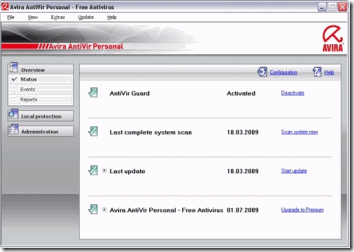
Review – Avira AntiVir Personal v9
I've tried many anti-virus programs in my day. Some were too slow, some were too resource intensive, others just became so bloated that it was darn right silly. Why, in a time where computers had much less RAM and hard drive space, would you make your security program so big and laggy?
The computers we use today no longer have such limitations, but it is no excuse to stop using well-made software. Avira Antivir is a commercial anti-virus which also comes as a very good free version. In fact, it rates highly in the av-comparatives.org test results every time. The only price to pay for such security is a pop-up window once a day during definition updates. But that's not that bad now, is it? You have a small, fast scanning, regularly updated anti-virus to protect you.
I've tried others and yet I keep coming back to Avira. Why use anything else when you have a free product that is as good as or better than pay products after all? Save yourself some money and get yourself some peace of mind.
---
URL: http://www.avira.com/en/avira-free-antivirus
Thursday, May 19, 2011
Review – Canabalt
This little flash game got me hooked on the first try. Imagine if you will a game so simple, you only need to use one key on your keyboard. Sounds like an old school game from Atari or something, right? Well what if I told you that you didn't even need to move around, but only jump using that one key?
Canabalt is a very fast-paced side scrolling game where your player is running at high-speed through a city under attack and you must help him jump over obstacles, through windows and from one rooftop to the next. It sounds rather simple but you really must pay attention because anything can and will happen. The events and buildings are generated randomly every time you start the level so there's no way you'll be memorizing a way through it all anytime soon.
This one is a classic and a definitive keeper. Most highly recommended to anyone.
---
URL: http://www.adamatomic.com/canabalt/
Tuesday, May 17, 2011
Review – CCleaner v3.04
Privacy on a computer may be an oxymoron, but a bit of help never hurts. Enter Ccleaner (formerly called Crap Cleaner), a small and fast utility that can be used to remove certain traces of your computer usage to give you back a bit of privacy from snooping eyes.
The most basic function that this program offers is to clear out MRU (most recently used) lists from Windows and supported apps on your computer, such as text editing programs and web browsers. It also goes beyond that to clear out temp files, invalid registry entries and your DNS cache.
Two other included features are basic control over what programs start with Windows and an alternative to the Add/Remove control panel list which loads up faster than the OS equivalent.
As with all system utilities however, caution must be used so that your system doesn't get pooched, but I am including this review for the more tech-savvy user anyhow.
Enjoy!
---
URL: http://www.piriform.com/ccleaner/
Sunday, May 15, 2011
Review – Defraggler v2.03
Although I have previously reviewed MyDefrag, I wanted to quickly mention Piriform's Defraggler.
This program can defrag a drive for you the same as other defrag apps, but what I like about it is the option to defrag individual files. This way if you only have a dozen or so files that are fragmented you won't have to run through the entire drive. There are some disadvantages however to foregoing a proper defragmentation and optimization procedure, so a program like MyDefrag is usually prefered.
---
URL: http://www.piriform.com/defraggler/
Thursday, May 12, 2011
Review – Fancy Pants Adventure
I can't really describe it to you, you must play it to believe it. I recommend this game to anyone at any time.
---
URL: http://armorgames.com/author/DrNeroCF
Labels
Blog Archive
- May 2013 (2)
- August 2012 (2)
- June 2012 (1)
- August 2011 (1)
- May 2011 (11)
- April 2011 (12)
- March 2011 (5)
- February 2011 (2)
- January 2011 (4)
- December 2010 (2)
- November 2010 (2)
- June 2010 (1)